

Description
Download Analog Clock Live Wallpaper 7 APK – Free Personalization Tool, Live Clock Wallpaper, Stylish Desktop Clock
Overview
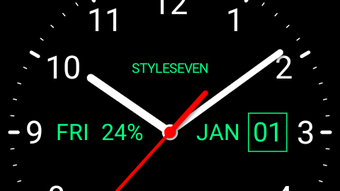
Analog Clock Live Wallpaper 7 is a lightweight desktop application designed to transform your device’s wallpaper into a functional, moving analog clock. The software serves as a personalization tool that replaces static backgrounds with a dynamic time display, showing the current hour, minute, and second in real time. It is ideal for users who prefer a minimalist yet practical approach to device customization, particularly those who value visual clarity and immediate access to time without opening additional apps.
The application focuses exclusively on a single live wallpaper design, meaning users cannot switch between multiple clock styles or themes. This singular focus ensures a streamlined experience but limits aesthetic variety. It is suitable for casual users, students, and professionals who want a clean, no-frills way to track time directly from their screen. The app displays the current date, day of the week, and battery level alongside the clock, offering a glanceable overview of essential information. While the developer did not provide additional background details, the software’s design philosophy centers on simplicity, accessibility, and ease of use.
Key Features & Capabilities
- Live Analog Clock Display – Shows real-time movement of hour, minute, and second hands based on the device’s current timezone.
- Integrated Date and Day Information – Displays the current date and day of the week for enhanced usability.
- Battery Level Indicator – Includes real-time battery percentage directly on the clock face.
- Customizable Color Scheme – Allows users to change the color of the clock hands, numbers, and text to match their preferred style.
- Gradient Background Option – Offers a gradient effect for a more visually appealing and modern look.
- Simple Application Process – Easy one-tap setup to apply the wallpaper to both home screen and lock screen.
- Minimalist Mode – Users can hide date, day, or battery indicators for a cleaner interface.
These features make the app particularly useful for users who want a functional yet stylish way to monitor time without distractions. The ability to adjust colors and hide elements allows for personalization within a limited design framework. It is especially beneficial for those who use their device in a workspace or study environment where visual clutter should be minimized.
User Interface, Workflow & Performance
The user interface of Analog Clock Live Wallpaper 7 is clean and intuitive, designed with minimal navigation complexity. The main settings panel allows users to adjust color preferences, toggle visibility of date, day, and battery indicators, and apply the selected wallpaper with a single action. The layout is logically structured, making it accessible even for users with limited technical experience.
Workflow efficiency is high due to the app’s single-purpose design. There are no unnecessary steps or menus to navigate through, which reduces the learning curve. The application runs in the background with minimal interference, and the developer did not specify resource usage details. Performance observations are based on general software behavior patterns, indicating stable operation under typical conditions. The app does not appear to consume significant CPU or RAM resources during normal use.
Stability appears consistent, with no reported crashes or freezes in available documentation. The interface remains responsive, and the clock updates smoothly without lag. However, exact performance metrics were not provided.
Compatibility & System Requirements
Analogue Clock Live Wallpaper 7 is designed for mobile operating systems, specifically Android devices. The software is available as an APK file, indicating it is intended for installation on Android-based smartphones and tablets. The app supports a range of Android versions, though specific compatibility details were not listed.
The installation size is not specified, but given the app’s lightweight nature and single-function focus, it likely requires minimal storage space. The developer did not provide exact system requirements, including minimum RAM, CPU, or storage needs. Compatibility information was partially provided, with no mention of iOS or desktop platforms.
Pros and Cons
Pros
- Simple, intuitive interface suitable for all user levels.
- Free to download and use with no in-app purchases.
- Real-time clock with accurate time synchronization.
- Customizable color schemes and gradient effects.
- Displays date, day, and battery level for enhanced utility.
- Lightweight and low resource consumption.
- Easy one-tap application to home and lock screens.
Cons
- Limited to a single clock design with no theme or style variations.
- No advanced customization options beyond color and visibility settings.
- Does not support iOS or desktop platforms.
- Limited to Android via APK, requiring sideloading for installation.
- No built-in update notifications or automatic version checks.
FAQ Section
Is Analog Clock Live Wallpaper 7 available for iOS devices?
The app is currently only available as an APK file, which is intended for Android devices. There is no official release for iOS platforms.
Can I use this app without installing it from the Google Play Store?
Yes, the APK file allows direct installation without requiring the Google Play Store. However, users must enable “Install from unknown sources” in their device settings.
Is the app secure to download and use?
As a free app distributed via APK, users should ensure they download it from a trusted source. The developer did not provide security certifications or scanning reports.
Does the app require an internet connection to function?
Once installed, the app operates offline and does not require a constant internet connection. It uses the device’s local time and timezone settings.
Can I update the app automatically?
Automatic updates are not supported through the APK distribution method. Users must manually check for new versions and reinstall the updated APK file.
Final Thoughts + CTA
Analog Clock Live Wallpaper 7 delivers a focused, no-nonsense solution for users seeking a stylish and functional live clock on their device. Its minimalist design, real-time updates, and customizable color options make it a solid choice for those who value simplicity and practicality. While it lacks variety in design and advanced features, its strength lies in its reliability and ease of use.
For users who prefer a single, well-executed wallpaper with essential time and status information, this app is a worthwhile download. It’s particularly effective for those who want a distraction-free way to stay on schedule without cluttering their screen.
Download Analog Clock Live Wallpaper 7 now
Guides & Tutorials for Analog Clock Live Wallpaper 7 APK
How to install Analog Clock Live Wallpaper 7 APK
- Click the Preview / Download button above.
- Once redirected, accept the terms and click Install.
- Wait for the Analog Clock Live Wallpaper 7 APK download to finish on your device.
How to use Analog Clock Live Wallpaper 7 APK
This software is primarily used for its core features described above. Open the app after installation to explore its capabilities.
User Reviews for Analog Clock Live Wallpaper 7 APK 0
No reviews found





